Students enrolled in Indira Gandhi National Open University (IGNOU) must understand that assignments are a vital part of their academic evaluation. Before starting to write assignments, it is extremely important to carefully read all the guidelines issued by the university. Ignoring instructions or missing important details may lead to rejection of assignments, delay in evaluation, or marks not being updated in the grade card.
Many students focus only on writing answers but forget that proper presentation, especially the assignment cover page (front page), plays an equally important role. The cover page acts as an identification sheet that helps evaluators understand who submitted the assignment, for which course, and under which programme.
This guide explains everything in simple language—from what the front page is, what details must be written, how to prepare assignments correctly, and how to avoid common mistakes.
Why IGNOU Assignment Front Page is Important
The assignment front page is the first page attached to your assignment file. It contains all your academic and personal details that help the university identify your submission correctly.
When thousands of assignments are submitted at study centres, evaluators rely on the front page to sort and verify them. If your front page is incomplete or missing, your assignment may not be processed properly. In some cases, it can even lead to rejection or marks not being uploaded.
Therefore, students must ensure that every assignment they submit has a properly filled front page attached at the top.
What is an IGNOU Assignment Front Page?
The front page, also known as the cover page, is a sheet placed at the beginning of your assignment. It includes details such as your name, enrollment number, course code, and study centre information.
This page acts like a label for your assignment. Without it, the evaluator may not be able to link your answers with your academic record.
In most cases, students are required to prepare a separate front page for each subject or course. This means if you have five subjects, you must create five separate assignments with individual cover pages.
The front page or cover page is the first page of your IGNOU assignment. It acts as the official record that helps evaluators identify your work. A correct format ensures:
- Your assignment is accepted without rejection.
- The examiner can easily track your enrollment details.
- Timely and correct marking of assignments.
- Avoids mix‑ups during evaluation at the Regional Centre.
Mandatory Details for IGNOU Assignment Front Page
When preparing your IGNOU assignment cover page, make sure to include the following details:
- Name of the Student
- Enrollment Number
- Program Name (e.g., BA, MA, MBA, etc.)
- Course Code & Course Title
- Assignment Code (available in the assignment booklet)
- Study Centre Code
- Regional Centre Name
- Session & Year (e.g., July 2025 / January 2025)
- Mobile Number & Email ID (for communication)
- Full Address of the Student
- Signature of the Student
Sample Format of IGNOU Assignment Front Page
Below is a recommended format for your IGNOU assignment cover page:
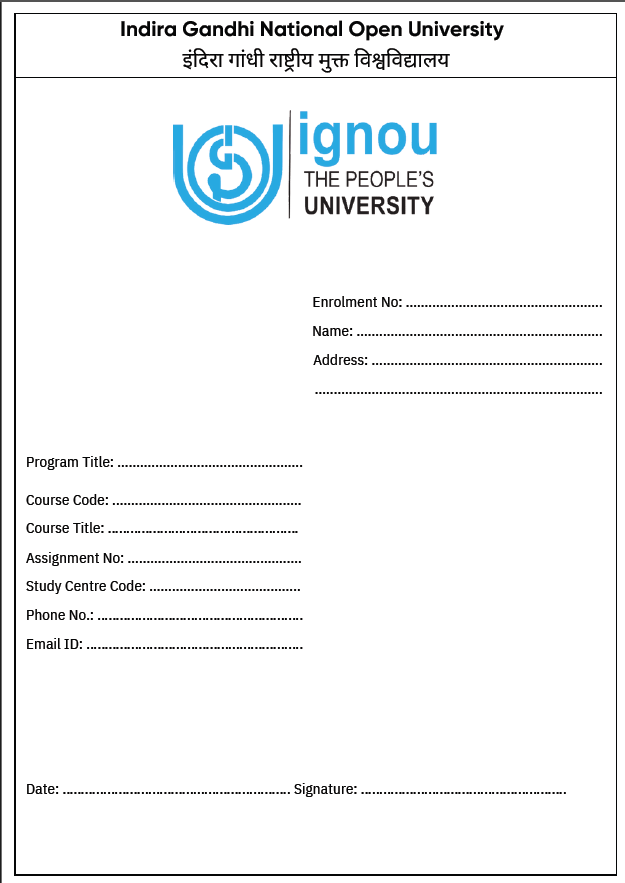
IGNOU Assignment Front Page PDF Download
To make things easier, IGNOU provides a ready-made front page format that students can download and print. This template includes all the required fields.
Students can simply print the template and fill in the details using a pen. This ensures that no important information is missed.
If you are submitting assignments online, you should attach this filled front page as the first page of your scanned PDF file.
Many students prefer ready‑to‑use formats to save time. You can prepare your own front page or download a PDF template from reliable sources.
👉 Click Here to Download IGNOU Assignment Front Page PDF
Step‑by‑Step Guide to Attaching IGNOU Assignment Front Page
- Download or Create the Front Page
Use the above format or download the PDF template. - Fill in Accurate Details
Double‑check your enrollment number, course code, and assignment code. - Print and Attach
Print the cover page on A4-size paper and place it on the top of each assignment. - Submit to the Study Centre
Submit your assignments before the deadline at your IGNOU Study Centre.
Rules for Writing IGNOU Assignments Properly
- Writing assignments is not just about answering questions; it also involves following certain presentation rules. These rules ensure that your assignment is neat, readable, and acceptable.
- Assignments should generally be written on A4-sized paper. Using ruled sheets is recommended because it improves readability.
- Students should use only blue or black ink while writing answers. Using red ink is not allowed, as it is reserved for evaluators.
- Proper margins should be maintained on both sides of the page, and spacing between lines should be neat and consistent. Each answer should begin with a clearly written question number.
- Page numbering is also very important. Every page should be numbered in sequence to avoid confusion.
- In some cases, study centres may recommend writing your name and enrollment number on each page. This helps prevent loss or mixing of pages during evaluation.
- Assignments must be handwritten in most programmes. Typed or printed assignments are often not accepted unless specifically allowed.
- Students should also avoid copying content from others or from study material. Copied assignments may receive zero marks or be rejected entirely.
- Finally, assignments should be properly stapled or bound so that pages remain secure.
Common Mistakes That Lead to Rejection
Many students face issues not because of poor answers, but due to simple mistakes in submission. Some of the most common errors include writing the wrong course code, missing the enrollment number, or not mentioning the correct session.
Another frequent mistake is attaching one cover page for multiple subjects, which creates confusion during evaluation. Submitting loose pages without proper binding is also risky, as pages can get lost.
In online submissions, uploading all subjects in a single PDF file instead of separate files can also lead to rejection. Lastly, not keeping proof of submission can create difficulties if any issue arises later.
IGNOU Assignment Submission Tips
- Always keep a photocopy or scanned copy of your assignment.
- Submit assignments before the deadline to avoid last‑minute issues.
- Get a receipt from your study centre as proof of submission.
- Check the IGNOU official website regularly for assignment guidelines.
A properly filled IGNOU Assignment Front Page (Cover Page) is essential for the smooth evaluation of your assignments. Using the correct format not only helps you avoid rejection but also ensures your hard work is recognized.
You can use the free PDF format provided above or create your own following the official guidelines. Make sure to fill in every detail carefully and submit your assignments on time.
With this step, you’re one step closer to success in your IGNOU academic journey.
Can You Appear in Exams Without Submitting Assignments?
Assignments are compulsory for appearing in IGNOU examinations. Students who do not submit assignments are not eligible to fill the exam form or appear in the Term-End Examination.
This makes it clear that assignments are not optional—they are a mandatory part of the academic process.
Submission and Safety Practices
- After completing your assignment, it is important to follow proper submission procedures.
- Always keep a photocopy or scanned version of your assignment before submitting it. This acts as a backup in case your assignment is misplaced.
- When submitting offline, collect a receipt from the study centre as proof of submission. This receipt is very important if your marks are not updated later.
- For online submission, keep a screenshot or confirmation email as evidence.
Summary
Preparing and submitting IGNOU assignments correctly is essential for academic success. The assignment front page may seem like a small detail, but it plays a crucial role in ensuring that your work is properly evaluated.
By carefully following all instructions, maintaining proper format, and avoiding common mistakes, students can ensure smooth processing of their assignments.
Always remember that assignments are a gateway to your final examination. Completing them properly not only improves your grades but also ensures your eligibility to appear in exams.
Frequently Asked Questions (FAQs)
Q1. Is the IGNOU assignment front page compulsory?
Answer: Yes, it is mandatory to include all required details on the first page of every assignment. Without it, your assignment may not be accepted or evaluated properly.
Q2. Should the front page be separate or part of the answer sheet?
Answer: It depends on your study centre. In many cases, the first page of your answer sheet can serve as the front page if all details are included. However, some centres require a separate cover page.
Q3. What details must be included on the front page?
Answer: You must include your name, enrollment number, programme, course code, subject title, assignment code, study centre, session, contact details, signature, and date.
Q4. Do I need a separate front page for each subject?
Answer: Yes, each subject must have its own assignment file with a separate front page.
Q5. Are typed assignments allowed?
Answer: In most cases, assignments must be handwritten. Typed submissions are usually not accepted unless specifically permitted.
Q6. Which paper size should be used?
Answer: A4 size is generally recommended unless your study centre specifies otherwise.
Q7. Should I write details on every page?
Answer: It is good practice to write your enrollment number and course code on each page to avoid confusion.
Q8. How should I arrange the assignment pages?
Answer: Pages should be properly stapled or bound. Avoid submitting loose sheets.
Q9. Where should I submit the assignments?
Answer: Assignments are usually submitted at your study centre, but instructions may vary depending on your regional centre.
Q10. Can assignments be submitted online?
Answer: Yes, but only if your regional centre provides an online submission option.
Q11. How can I confirm submission?
Answer: Always keep your receipt or confirmation proof after submission.
Q12. When are assignment marks updated?
Answer: Marks are updated after evaluation, but it may take several weeks depending on workload.